Live window thumbnails
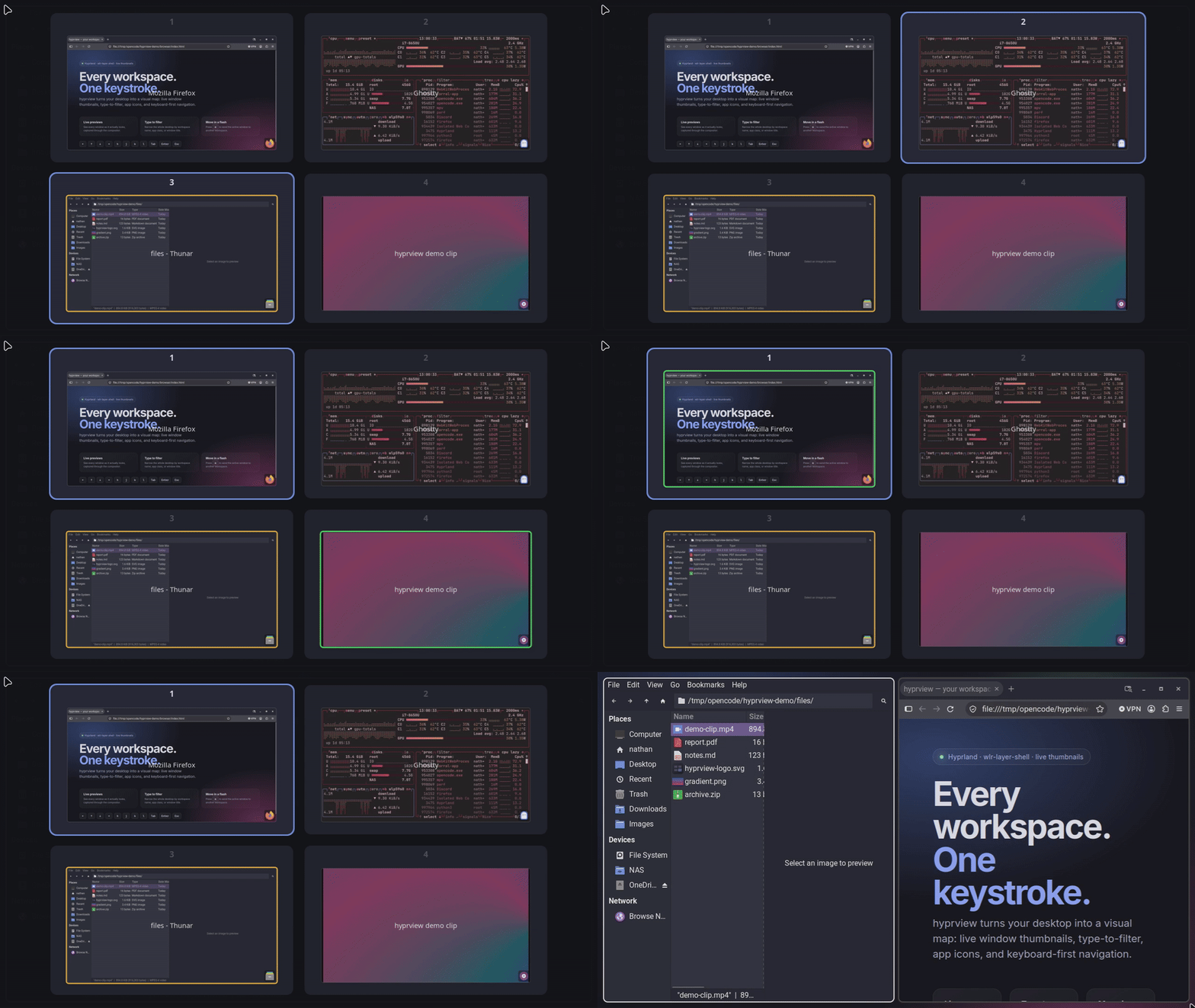
Real captures through hyprland-toplevel-export-v1, not static icons or placeholder rectangles.
 hyprview
 turns your desktop into a visual map: live window thumbnails, type-to-filter, app icons, and keyboard-first navigation.
Features
Find, focus, and move windows without breaking your flow.
Real captures through hyprland-toplevel-export-v1, not static icons or placeholder rectangles.
Arrow keys or hjkl, number jumps, and Tab cycling across every workspace, starting from the focused window.
Filter by workspace name, app class, or window title. Non-matching windows dim while the match stays in focus.
Press m to send the active window to the selected workspace, then follow it there if you want.
Icons resolve from your icon theme and .desktop files. Hover a window for its app name, class, and title.
Sensible defaults, a TOML file only when you need it, and live reload on save or SIGHUP.
How it works
hyprview takes a single-instance lock and waits quietly in ppoll, using almost no CPU while hidden.
On SIGUSR1 it creates a fullscreen wlr-layer-shell surface and asks Hyprland for its workspaces and windows.
Cards appear immediately, then thumbnails stream in one at a time without blocking input or the event loop.
Install
Every GitHub release ships a prebuilt x86_64 binary, a checksum, and a stable source tarball. AUR publishing is paused while Arch restricts accounts and pushes.
Requires the Wayland, Cairo, and Pango runtime libraries.
curl -LO https://github.com/nnthnn/hyprview/releases/latest/download/hyprview-x86_64-unknown-linux-gnu.tar.gz
curl -LO https://github.com/nnthnn/hyprview/releases/latest/download/hyprview-x86_64-unknown-linux-gnu.tar.gz.sha256
sha256sum -c hyprview-x86_64-unknown-linux-gnu.tar.gz.sha256
tar xzf hyprview-x86_64-unknown-linux-gnu.tar.gz
sudo install -Dm755 hyprview/hyprview /usr/local/bin/hyprviewYou need a Rust toolchain, pkg-config, and the Wayland, Cairo, and Pango development headers.
git clone https://github.com/nnthnn/hyprview.git
cd hyprview
cargo build --release

sudo install -Dm755 target/release/hyprview \
  /usr/local/bin/hyprview
Cargo users can install with cargo install --git https://github.com/nnthnn/hyprview --locked.
Debian/Ubuntu build dependencies: cargo pkg-config libwayland-dev libpango1.0-dev.
Arch: base-devel rust wayland pango.
Arch users can build the tracked hyprview-git PKGBUILD locally from packaging/aur/hyprview-git with makepkg -si.
Also works on Sway in fallback mode: workspace data over i3 IPC, with coloured placeholders instead of live thumbnails.
Configure
hyprview reads $XDG_CONFIG_HOME/hyprview/config.toml and falls back to ~/.config/hyprview/config.toml. Every key is optional, and the file is watched for changes.
See the full configuration reference for colors, fonts, layout, keybindings, and behavior.
hl.on("hyprland.start", function()
    hl.exec_cmd("hyprview")
end)

hl.bind("SUPER + Tab", hl.dsp.exec_cmd("hyprview --toggle"))[appearance]
show_app_icons = true
icon_size = 20.0
[behavior]
allow_mouse = false
switch_on_move = true
[keybindings]
move_window = "m"
tab = "Tab"Controls
Mouse support is opt-in with --allow-mouse or behavior.allow_mouse.
Build hyprview, bind one key, and stop hunting for windows.